Firewall Migration, Cloud Security Deployment & Hands-On Training: Palo Alto, Check Point, Fortinet, Forescout & Google AI Agents

Techclick — firewall migration, cloud security & AI enablement
Enterprises are moving workloads to the cloud, consolidating security stacks, and asking teams to do more with less. That shift only works when firewalls, network access control, and operations tooling are migrated correctly—and when people know how to run them day to day.
We provide end-to-end support: firewall migration, deployment, configuration, on-premises-to-cloud implementation, hands-on training on the tools we deploy, and practical Google AI agent enablement—not training alone, but real implementation in your environment.
Why Firewall Migration and Cloud Deployment Fail Without Experts

↗ Infographic — click for Techclick services
Many projects stall after a “lift and shift” of rules or a partial cloud cutover. Common failure points include:
Incomplete rule translation between vendors (Palo Alto ↔ Check Point ↔ Fortinet)
Missing identity and NAC context when Forescout or similar controls are not redesigned for hybrid networks
Cloud security groups and firewall policies that do not mirror on-premises intent
Teams trained on slides, not on the live platforms they must operate
Our approach covers design → migration → deployment → configuration → validation → training → AI-assisted operations.
Firewall Platforms We Deploy, Configure & Support

↗ Platform comparison infographic — click for blog
Palo Alto Networks

↗ Palo Alto deployment flow chart — click for support
We support Palo Alto firewall migration and deployment across data center, branch, and cloud use cases—including policy design, App-ID and User-ID readiness, high availability, and cutover planning. Teams get configuration walkthroughs and operational training so changes stay controlled after go-live.
Check Point

↗ Check Point policy migration flow chart
From policy packages and gateways to management server hygiene, we help organizations migrate and deploy Check Point environments with clean rulebases, documented change processes, and operator-ready training.
Fortinet (FortiGate)

↗ FortiGate rollout flow chart
We deploy and configure FortiGate firewalls for on-premises, hybrid, and cloud-connected designs—covering security profiles, VPN, SD-WAN-related firewall roles where applicable, and practical Fortinet training for day-2 operations.
Forescout
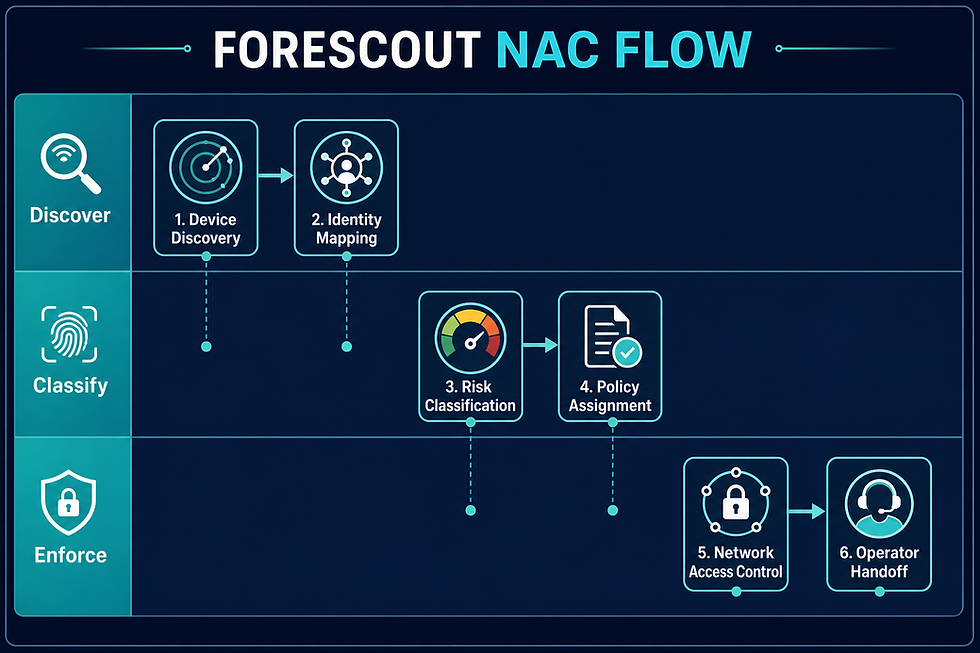
↗ Forescout NAC swimlane flow chart — related lab
We have deployed Forescout for network access visibility and control. Engagements typically include discovery, policy design, integration with existing firewall and identity stacks, and operator training so NAC is not a black box after implementation.
Overview device & firewall migration flow (end-to-end), followed by the detailed on-prem to cloud chart in this section:

↗ Overview migration flow chart — different layout from section charts below
On-Premises to Cloud Security Implementation

↗ On-prem to cloud migration flow chart
Moving from on-premises firewalls to cloud (or hybrid) is more than copying ACL lines. We help with:
Assessment — Current rulebases, traffic patterns, dependencies, and compliance constraints
Target architecture — Cloud-native controls vs. virtual firewalls (Palo Alto, Check Point, Fortinet) vs. hybrid
Migration waves — Pilot, critical apps, bulk cutover, decommission
Configuration hardening — Least privilege, logging, backups, change control
Star / phased deployment — Structured rollout so production risk stays bounded
Knowledge transfer — Hands-on training on the exact tools in your stack
Whether you stay multi-vendor or consolidate, the goal is a secure, operable, documented end state.
What “All Tools” Training Looks Like

↗ Training path infographic
We do not stop at deployment. For the platforms we implement, we deliver practical training that covers:
Platform overview and architecture
Day-1 and day-2 configuration tasks
Policy design and change management
Troubleshooting and logging
Migration and rollback playbooks
Cloud vs. on-premises operational differences
Training is aligned to Palo Alto, Check Point, Fortinet, Forescout, and the surrounding tooling your project actually uses—so your team can sustain the environment after our engagement.
Google AI Agents: Training and Real Implementation

↗ Google AI agents enablement flow chart
Security teams are adopting AI to accelerate triage, documentation, and repeatable ops tasks. We work with Google AI agents in two ways:
Training — How agents fit into security workflows, safe use of prompts and tools, and governance basics
Implementation — We help you design and deploy agent-assisted processes—not only classroom content. That includes use-case definition, integration points with your security stack, guardrails, and handoff to your operators
AI does not replace firewall expertise. It amplifies teams who already have solid migration, configuration, and monitoring practices. We connect both: strong network security foundations and practical Google AI agent enablement.
Who This Is For

↗ Audience matrix infographic — contact Techclick
IT and security leaders planning firewall refresh or vendor migration
Teams moving on-premises security to cloud or hybrid
Organizations deploying Palo Alto, Check Point, Fortinet, or Forescout
Operations groups that need hands-on training, not only theory
Security and IT teams ready to implement Google AI agents alongside their stack
Our Engagement Model

↗ Engagement timeline infographic — start discovery
Discover — Inventory, risk, and migration scope
Design — Target architecture and cutover plan
Deploy & configure — Palo Alto / Check Point / Fortinet / Forescout as scoped
Validate — Policy tests, logging, failover checks
Train — Hands-on labs on your platforms
AI enable — Google AI agent training and implementation support
Get Started

↗ Click to contact Techclick Infosec
If you need firewall migration, cloud or hybrid deployment, configuration of Palo Alto, Check Point, Fortinet, or Forescout, hands-on tool training, or Google AI agent implementation—not just slides—reach out to start a discovery conversation.
Secure the move to cloud. Train the team that will run it. Put AI to work where it actually helps.


Comments